
Schema are similar to tables or collections in other databases. This section will explain how to see the details of a particular schema under a particular Family. Addition to this also provides the functionality to add a new schema.
Schema Details
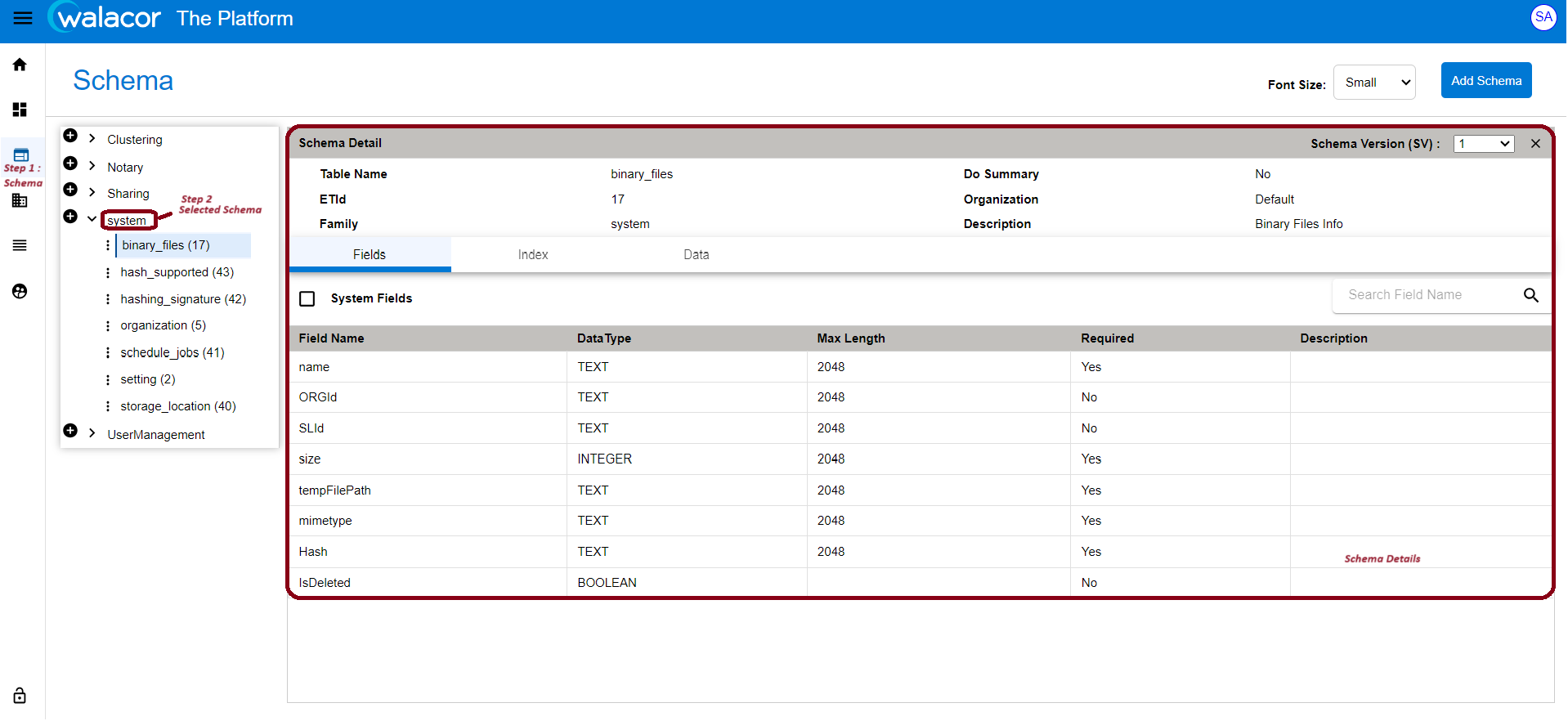
The Complete information about the Schema can be viewed using 3 tabs, by default Fields tab is selected, other ones are Index and the Data.
Process:
-
All Schema Names will populate in Schema Name dropdown list
-
Schema List -->
-
By default, all existing schemas will display in schema list
-
On selection of selected schema, only selected schema will display in the Schema list
-
-
On selection of Schema -->
-
Selected schema detail will display in the right pane with below detail :
-
schema detail (ET ID, Org Id, Do Summary, Table name)
-
on selection of column tab, all created fields(columns) will display in the column(fields) list
-
By default first field, data will be displayed.
-
Column detail will be displayed on selecting the respective column.
-
on selecting schema, detail will be displayed in view mode
-
On clicking edit, fields will be editable.
-
-
Introduction
Some Important Terms:
|
Term |
Definition |
|---|---|
|
ETId (Envelope Type ID) |
A number that uniquely identifies a data storage structure. It is used by API calls to signify where a call should be directed |
Table 5.1.1.
Allowed Data Types:
|
Data Type |
Max Length |
Decimals |
|---|---|---|
|
INTEGER |
2048 |
|
|
TEXT |
64000 |
|
|
BOOLEAN |
(N/A) |
|
|
DECIMAL |
18 |
6 |
|
DATETIME |
(N/A) |
|
Table 5.1.2.
The idea of a schema is based on a database.
Existing Schema Validations
On opening modal we have Dropdown to select ETId for the schema.
ETId: ETId is Required. It should be always greater than 1000. Below 1000 are reserved.
DoSummary: DoSummary is Required
TableName: If Dosummary is 'Yes' we need to give a new tablename that will contain updated changes else If Dosummary is 'No' tablename is not required.
ORGId: ORGId is Required
Field Validations for adding or updating schema fields:
FieldName: FieldName is a string type and is required.
DataType: DataType is a string type and is required.
MaxLength: MaxLength is number type and is required.
Required: Required is a boolean type and is required. We can also add choices for a field.
Choices will have:
key value: It depends on Datatype and Maxlength. For example, if datatype is text and Maxlength is 5, value = "Hello". Value cannot be of any other Datatype.
Index Validations for adding or updating schema indexes:
Fields: It shows all fieldnames in the dropdown. We can select multiple schema Fieldnames from the dropdown. => If schema fieldName changes, then in indexes tab selected fieldnames from the dropdown will show an error.
IndexValue: Index value is alphanumeric
ForceUpdate: Force Update is boolean
Delete: Delete is boolean.